All addresses above are on 172.22.0.0/24. Hover any node for a role description and its pinned GitHub source / Docker image links.
06 · THE SERVICE-BASED CORE
Discovery, routing and policy.
NRF · .10
Network-function directory and discovery.
SCP · .11
Service-request proxy.
PCF · .15
Session policy decisions.
NSSF · .16
Network-slice selection.
BSF · .17
Policy binding information.
MongoDB · .2
Subscriber database on the core bridge.
SBI uses cleartext HTTP/2 on port 7777 in this lab. UPF association uses PFCP rather than NRF registration.
07 · START THE LAB
Start capture before core signalling.
Windows / Docker Desktop
.\start.ps1 -Factory -Mobility
# Prepared images, no builds or pulls:
.\start.ps1 -Factory -Mobility -Offline
Linux / Docker Engine
sudo modprobe sctp
bash start.sh --factory --mobility
# Prepared images, no builds or pulls:
bash start.sh --factory --mobility --offline
Omit Factory for the phone lab. Mobility enables the existing UE6 handover demo. Use Linux containers with SCTP and TUN support. Native Linux needs Compose 2.36+.
Factory startup creates a fresh, stopped run. Open the factory view, wait for 70/70 verified UE paths, then start.
Pause presentation of events, then reveal one event.
Plane checkboxes
Filter the diagram by control, SBI, PFCP or user data.
Follow latest
Keep the newest sequence row visible; untick to inspect history.
Playback delays the display while the live network and factory keep running. The factory's separate Simulation speed control selects 1× or 10× operation. Export latest saves the current sequence as Mermaid, PNG or SVG.
2Select different UEs, write up to 160 characters and press Send SMS.
3Watch delivery and the reverse receipt in the sequence diagram.
4Filter the recipient's inbox; use ⇄ to send a reply.
UE1 tunnel→gNB / UPF→UE2 tunnel
UTF-8 text over UDP 9002, bound to each phone's tunnel. Delivery is shown after the receiving UE saves the message and returns its matching receipt. This is an application simulation of SMS, not native NAS/IMS SMS.
13 · DELIVERY READINESS
A tunnel IP alone is not enough.
Before each send
A short probe checks that the receiving phone can reply through the actual UE data path.
If radio context is stale
With a healthy UPF, active phones and the gNB reconnect once, then the path is checked again.
Reconnection can take tens of seconds and briefly interrupts other UE traffic. A deliberately unavailable UPF requires Recover UPF. Probe messages never enter SMS inboxes.
A delivery failure stays visible. Failed attempts are excluded from recipient inboxes. Retried IDs are deduplicated across receiver restarts.
14 · COMPARE TRAFFIC PROFILES
Different apps. The same user plane.
Phone / app
Behavior
N6 service
UE1 · chat
Typed text and an echo reply
TCP 9000
UE2 · IoT sensor
Small JSON reading every 2 seconds
UDP 9001
UE3 · stream
About 2 Mbit/s download
HTTP 8080
UE4 · stream
About 4 Mbit/s download
HTTP 8080
Bulk app
iperf3 throughput test
TCP 5201
Choose 4 · Traffic mix. UL is solid, DL dashed in the chart. User rates come from captured GTP-U bytes and packets, not the requested app rate.
15 · CHANGE UE4'S POLICY
Cap a 4 Mbit/s stream at 1 Mbit/s.
Start the traffic mix and observe UE4's downlink.
Choose 5 · Cap UE4 at 1 Mbit/s.
The subscriber AMBR changes, its session is recreated, and the stream restarts.
Compare measured throughput before and after; use Reset UE4 QoS to restore 10 Mbit/s AMBR.
This lab uses a supplemental Linux tc adapter on the UPF to enforce the configured limit. It is not a claim of stock Open5GS radio QoS enforcement.
16 · BREAK THE NETWORK AND RECOVER
Control health and data health differ.
6 · Wrong key
UE5 fails authentication and obtains no usable data session. Inspect the rejection in the sequence.
7 · Stop UPF
Chat and SMS delivery fail while AMF registration metrics can remain available.
1Choose 8 · Recover UPF.
2Wait for PFCP reassociation and rebuilt radio sessions.
3Send a fresh message and confirm its delivery receipt.
17 · NETWORK EXPOSURE
NEF at the application boundary
NEF lets an external Application Function subscribe to selected network information. The existing UE-to-UE SMS path works independently.
Open5GS 2.7.7 supplies the core. This lab adds a teaching NEF with an observer endpoint; native Namf / Nudm event exposure is not implemented.
18 · A SMART-METER DEMO
Queue a command while the meter sleeps
Use UE1 as the sending phone and UE2 as the meter. Queue: “Report your latest meter reading.”
1Prepare offline meter checks both paths, then stops UE2.
2Subscribe & queue maps meter-ue2 to UE2. The SMS stays queued.
3Bring meter online restores its session and verifies readiness.
NEF calls the AF. The AF sends the queued SMS through UE1. UE2 saves it and returns a delivery receipt.
Open the NEF demo ↗ · Watch the three status cards, exposure events, SMS inbox and latest sequence.
19 · CALLBACKS AND DELIVERY
Three separate pieces of evidence
Availability
Running UE containers, tunnel addresses and a successful tunnel-bound round-trip readiness probe.
Notification
Authenticated callback with subscription and command IDs. Persistent retries; the AF accepts it once.
Delivery
Actual SMS receipt from the destination UE. A callback alone does not prove SMS delivery.
Subscriptions and the command queue persist in Docker volumes. An interrupted dispatch reuses the same message ID so the receiving app can suppress duplicates.
The sequence includes AF, NEF, observer and separate UEs, with addresses and IDs. Live demo status continues during pause; recorded events follow playback.
20 · FACTORY FLEET
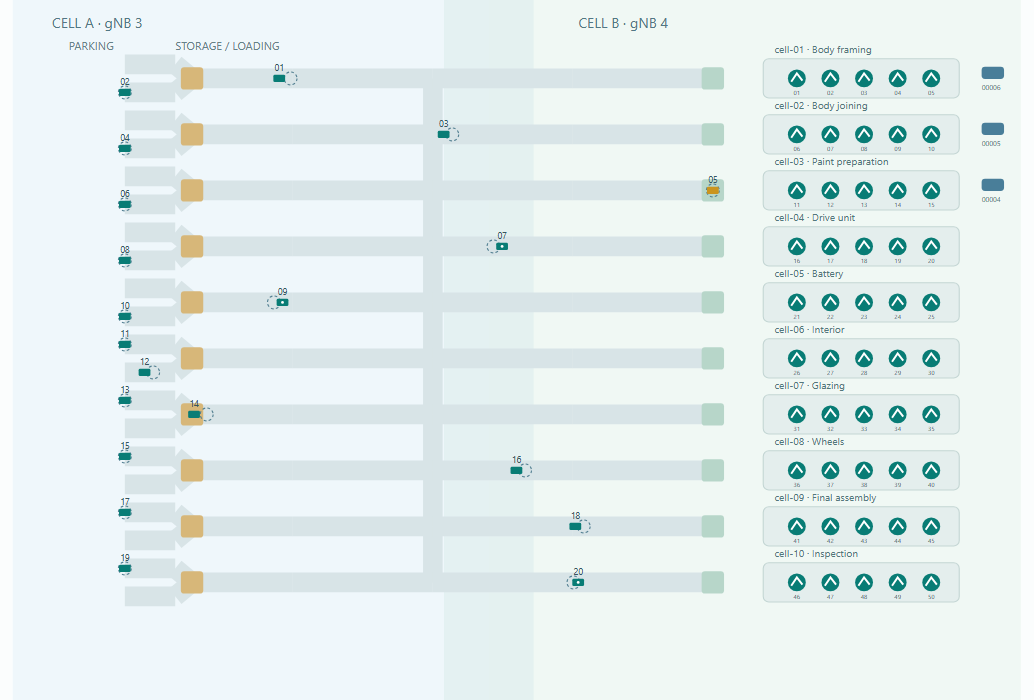
A car factory with 70 connected devices.
20 AGVs
Pick up parts, deliver to stations and return to parking.
50 assembly robots
Five distinct operations per workcell. Ten sequential stages complete each car.
70 individual UEs
Each device has its own identity, container and PDU session.
Live map capture. Solid shapes show actual positions. Outlines show the latest positions received by logistics.
Agents learn peer positions and delivery instructions through the network. Tunnel loss prevents application traffic.
22 · PARTS AND PRODUCTION
Every delivery closes a parts request.
1. Robot requests
Its kit, quantity and arrival deadline depend on local inventory.
2. Logistics assigns
Reserve stock and a route. Select an available AGV.
3. Robot instructs
The robot sends the delivery request directly to that AGV.
4. AGV picks up
Confirm instructions with logistics, then load the reserved parts.
5. Robot receives
A stopped AGV delivers. The robot acknowledges receipt.
6. AGV returns
A fresh parked acknowledgement releases the trip reservation.
Stable IDs and SQLite keep retries from reserving stock or crediting a delivery twice.
23 · COLLISION AVOIDANCE
Stale information makes vehicles brake.
Received positions
AGVs exchange heading, velocity, route, timestamp and sequence number at 10 Hz.
Exclusive space
Logistics reserves conflicting route sections using received telemetry.
Safe stopping
Conflicting data older than 500 ms, expired permission or path loss triggers braking.
Default speed: 1.5 m/s in factory time. Physics steps: at most 50 ms. Safety includes braking space and uncertainty from message age.
The world records actual collisions. It does not move vehicles out of danger or reveal hidden peer positions.
24 · OPERATIONAL SPEED
One real minute, ten factory minutes.
What advances
Normal 1×
Accelerated 10×
Factory time per real minute
1 minute
10 minutes
Movement, assembly and handling
Normal duration
Ten times faster
Minimum physics steps / real second
20
200
Position messages / real second
10
10
Stale-data cutoff in real time
500 ms
500 ms
Choose Simulation speed → Accelerated · 10× on the factory page. Switch rates without resetting the run.
Network timers, handovers and capture stay in real time. View pause and slow motion affect presentation. Real latency costs more factory time at 10×.
25 · FLEET MOBILITY
Two cells share the existing core.
Modeled coverage
Overlap, hysteresis and minimum dwell time trigger moves between two factory gNBs. Xn is the default. N2 is selectable.
Per-device continuity
One coordinator serializes transfers. Each result belongs to its own UE and records packet gaps, loss and TCP continuity.
Success requires captured signalling and a confirmed serving-cell change, with the UE process, IP, tunnel and logistics TCP connection preserved.
The map's cell zones are a simulation input. UERANSIM models radio transport over UDP.
26 · MEASURED RESULTS
Verified with all 70 factory UEs.
Live production run
Cars
Deliveries
Collisions
1×: 30 real minutes
9
101
0
10×: 3 real minutes
9
89
0
Complete fleet
Both runs used all 20 AGVs and 50 robots. The 10× run advanced 1,814 factory seconds.
Faults and replay
A 600 ms delay stopped a loaded AGV and retained its reservation. Replay preserved the recorded 10× rate.
Docker / WSL2, 14 October 2026. 84 Python and 6 JavaScript tests passed. These measurements describe the supplied 20/50 preset on this host.
27 · WHERE THE VISUALS COME FROM
Packets → events → explanations.
Packet capture
tshark decodes NAS/NGAP, SBI and PFCP; GTP-U flows are aggregated in 250 ms windows.
Backend
Normalizes and records events, adds NF metrics and publishes updates over WebSocket.
Dashboard
Topology, network sequences, charts, SMS history and factory snapshots.
Metrics are read from actual AMF / SMF / UPF endpoints. Missing native UPF counters are supplemented by measured capture counters. NF log fallbacks are labelled; inferred NAS radio hops are labelled too.
Sequence headers identify each UE separately. Control rows include RAN UE ID, PFCP SEID or HTTP/2 stream ID when available.
28 · THE OFFLINE SAFETY NET
Keep a recorded demonstration ready.
Every live event is saved to a timestamped JSONL recording. Replay runs without the core or a Docker control socket.
# PowerShell: run replay on a separate port
$env:DASHBOARD_PORT = '8089'
$env:REPLAY_FILE = 'recordings/sms-demo.jsonl'
docker compose -f docker-compose.replay.yml up -d --no-build --pull never
demo.jsonl: the complete demonstration. sms-demo.jsonl: signalling, packets and SMS. sms-messages.jsonl: just recorded SMS outcomes. nef-demo.jsonl: NEF subscriptions, callback and SMS receipt. Factory: choose a timestamped run containing factory snapshots.
Replay starts paused. Use Play / Step / Restart replay. Sending, factory speed and operational controls are disabled.
29 · A 12-MINUTE HANDS-ON RUN
Tell the story through actions.
Time
Action
Explain
0–1 min
Core, topology and node tooltips
Functions, addresses and two planes
1–3 min
Slow motion → Power on UE1
Registration and authentication
3–4 min
Data session → real time → Hello 5G
The forwarding path is created
4–6 min
Connect phones → SMS → reply
UE-to-UE delivery and receipts
6–8 min
Traffic mix
Profiles and UL / DL measurements
8–9 min
Cap UE4
Policy changes forwarding behavior
9–10 min
Wrong-key UE5
Authentication failure
10–12 min
Stop UPF → fail → recover → send
Registration does not guarantee delivery
30 · FACTORY WALKTHROUGH
Network behavior changes production.
Time
Action
Observe
0–1 min
Core factory group, then Start factory
70 verified UE paths and distinct devices
1–2 min
Select 10× and inspect an AGV
Faster factory clock, cargo and deliveries
2–3 min
Apply 600 ms delay, then clear it
Braking, retained space and resumed work
3–4 min
Move an AGV with Xn or N2
Serving cell, signalling and TCP continuity
4–5 min
Pause the view, then play recorded snapshots
Live operation continues. Replay disables controls.
 metriczone